


Skill Files: Plugins Of The Future
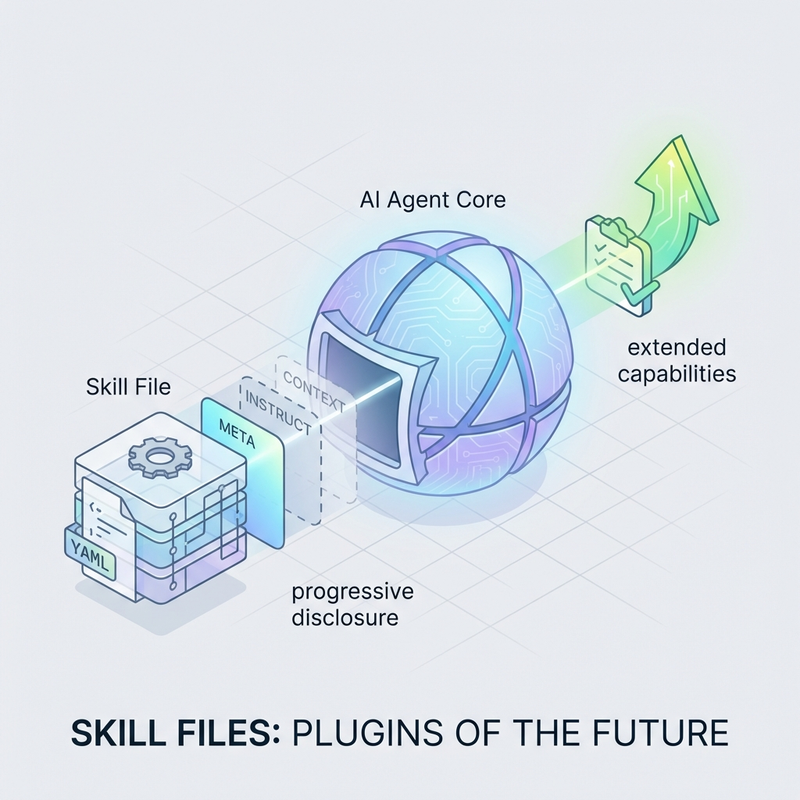
Skill Files: The Plugins of the Future for AI Agents
Introduction
If you’ve worked with WordPress, VS Code, or Figma, you already understand plugins-modular extensions that add new capabilities without modifying the core system. AI agents now have their own plugin standard: skill files.
Skill files represent a standardized format for packaging task-related instructions that AI agents can discover and execute. Unlike traditional plugins that require compilation or installation, skills work through progressive disclosure-agents load only essential information initially, pulling additional context as needed.
This guide walks through the fundamentals of skill files, from basic structure to practical implementation. You’ll learn how to create, organize, and deploy skills that extend your AI agent’s capabilities.
Prerequisites
Before building your first skill, you need:
- Access to an AI agent system that supports skill files (Claude Code, Microsoft Copilot, or similar)
- Basic understanding of YAML syntax for metadata
- Familiarity with command-line tools and file structure
- Optional: Knowledge of BASH scripting for executable skills
What Makes Skill Files Different
Traditional automation requires explicit programming. You write a script, define every conditional, handle every edge case. Skill files take a hybrid approach.
The skill provides structure and instructions. The AI agent interprets those instructions to execute the task. This means skills can handle judgment calls that would be difficult to script-like identifying whether committed files reference untracked dependencies.
The Progressive Disclosure Advantage
Skills don’t dump their entire contents into the agent’s context window at once. The agent sees:
1. Skill name and description (always)
2. Core instructions from SKILL.md (on invocation)
3. Supporting files and templates (when needed)
This keeps the agent’s working memory efficient while maintaining access to specialized knowledge.
Skill File Structure
Every skill lives in its own directory with a standardized structure:
skill-name/
├── SKILL.md          (required - metadata and instructions)
├── scripts/          (optional - executable files)
│   └── check.sh
└── assets/           (optional - templates and static files)
    └── template.md
Directory Location
Skills must be placed where your AI agent can find them:
- Claude Code (system-wide): `~/.claude/skills`
- Claude Code (project-specific): `.claude/skills`
- Microsoft Copilot: `~/.copilot/skills`
Project-specific skills override system-wide skills with the same name.
Creating Your First Skill: SKILL.md
The SKILL.md file contains YAML frontmatter followed by markdown instructions. Here’s the minimal structure:
---
name: skill-name
description: Brief description of what this skill does
---

# Skill Name

## Instructions

Tell the agent exactly what to do when this skill is invoked.

## Steps

1. First action
2. Second action
3. Third action
Naming Rules
- Use lowercase with hyphens (kebab-case)
- Match the folder name exactly
- Avoid spaces, underscores, or special characters
- Keep names descriptive: `prepare-pr` not `pr-thing`
Writing Effective Descriptions
The description appears in skill listings and helps agents decide when to invoke the skill. Make it specific:
❌ “Helps with pull requests”
✓ “Validates that all files are committed and dependencies are tracked before creating a pull request”
Example: prepare-pr Skill
Let’s build a practical skill that validates pull requests before submission.
Basic Version
Create `prepare-pr/SKILL.md`:
---
name: prepare-pr
description: Validate repository state before creating pull requests
---

# Prepare PR

## Instructions

Check the repository for uncommitted changes and respond with validation status.

## Steps

1. Run git status to check for modified files
2. If any files are uncommitted, respond with 👎
3. If all changes are committed, respond with 👍
This works, but it lacks depth. A more useful skill includes executable scripts and multi-stage validation.
Enhanced Version with Scripts
Create the script file `prepare-pr/scripts/check_uncommitted.sh`:
#!/bin/bash

# Check for modified but uncommitted files
MODIFIED=$(git status --porcelain | grep '^ M' | wc -l)

if [ $MODIFIED -gt 0 ]; then
    echo "FAIL: $MODIFIED files modified but not committed"
    git status --short
    exit 1
else
    echo "PASS: No uncommitted changes"
    exit 0
fi
Create the script file `prepare-pr/scripts/check_untracked.sh`:
#!/bin/bash

# Check for untracked files that might be dependencies
UNTRACKED=$(git ls-files --others --exclude-standard)

if [ -n "$UNTRACKED" ]; then
    echo "WARNING: Untracked files detected"
    echo "$UNTRACKED"
    echo ""
    echo "Checking if committed files reference these..."

    # This is where the agent's judgment comes in
    # It can analyze imports, require statements, etc.
    exit 2
else
    echo "PASS: No untracked files"
    exit 0
fi
Update `prepare-pr/SKILL.md` to use these scripts:
---
name: prepare-pr
description: Validate repository state and dependencies before creating pull requests
---

# Prepare PR

## Instructions

Perform two-stage validation before allowing pull request creation.

## Stage 1: Committed Changes

Run `scripts/check_uncommitted.sh` to verify all modified files are committed.

- Exit code 0: Pass
- Exit code 1: Fail - list uncommitted files and stop

## Stage 2: Dependency Check

Run `scripts/check_untracked.sh` to detect untracked files.

- Exit code 0: Pass
- Exit code 2: Analyze whether committed files import or reference these untracked files

### Dependency Analysis

If untracked files are detected:

1. Read the contents of committed files in the same directory
2. Check for import statements, require calls, or file path references
3. If dependencies found: 👎 "Untracked dependencies detected"
4. If no dependencies: 👍 "Repository ready for PR"

## Response Format

Always respond with emoji status:
- 👍 All validation passed
- 👎 Issues detected (list them)
Using Templates with Assets
Skills can include template files that the agent populates with dynamic values.
Example: Documentation Template
Create `document-api/assets/endpoint-template.md`:
# {endpoint_name} API Endpoint

## Overview
{description}

## Request Format
- Method: {http_method}
- URL: {url_pattern}
- Authentication: {auth_type}

## Parameters

{parameters_table}

## Response Format

{response_example}

## Error Codes

{error_codes}
The agent reads this template and replaces `{parameter_name}` placeholders with actual values based on the code it’s analyzing.
In your SKILL.md, reference the template:
---
name: document-api
description: Generate API documentation from code analysis
---

# Document API

## Instructions

1. Analyze the provided code to identify API endpoints
2. Extract parameters, response formats, and error handling
3. Use `assets/endpoint-template.md` to generate documentation
4. Replace all {placeholder} values with extracted information
When to Use Skills vs Scripts
Use a standalone script when:
- The task has zero ambiguity
- No judgment calls are required
- Input and output are completely deterministic
- Example: Running `git commit -m “message”`
Use a skill file when:
- The task requires interpretation
- Edge cases need intelligent handling
- Context matters for execution
- Example: Deciding if files are related dependencies
The prepare-pr skill demonstrates this perfectly. Checking for uncommitted files is scriptable. Determining whether those files are dependencies requires analysis.
Common Skill Patterns
Validation Skills
Pre-flight checks before operations:
- Code quality checks before deployment
- Dependency validation before publishing
- Format verification before submission
Documentation Skills
Automated documentation generation:
- API endpoint documentation from code
- README generation from project structure
- Changelog creation from commit history
Workflow Skills
Multi-step process automation:
- Release preparation (version bump, changelog, tag)
- Environment setup (dependencies, config, secrets)
- Testing workflows (unit, integration, E2E)
Troubleshooting
Skill Not Discovered
Problem: Agent doesn’t see your skill in available skills list.
Solutions:
1. Verify skill is in correct directory (`~/.claude/skills` or `.claude/skills`)
2. Check folder name matches `name:` in SKILL.md exactly
3. Ensure SKILL.md has valid YAML frontmatter (no syntax errors)
4. Restart your agent session to refresh skill discovery
Script Execution Fails
Problem: Skill invokes but scripts return errors.
Solutions:
1. Make scripts executable: `chmod +x scripts/*.sh`
2. Check shebang line: `#!/bin/bash` (not `/bin/sh` unless POSIX)
3. Test scripts manually: `./scripts/check_uncommitted.sh`
4. Verify relative paths work from skill directory
Agent Misinterprets Instructions
Problem: Agent executes skill but produces unexpected results.
Solutions:
1. Add numbered steps to SKILL.md for clarity
2. Include example outputs for each step
3. Specify exact response formats (emoji, text, JSON)
4. Use more explicit conditional language (“If X, then Y”)
Advanced: Multi-File Skills
Complex skills can organize instructions across multiple files:
advanced-skill/
├── SKILL.md
├── README.md          (usage examples)
├── scripts/
│   ├── validate.sh
│   ├── transform.sh
│   └── deploy.sh
├── assets/
│   ├── template-a.md
│   ├── template-b.md
│   └── config.json
└── docs/
    └── implementation-notes.md
Reference these files in SKILL.md:
---
name: advanced-skill
description: Complex multi-stage workflow with templates
---

# Advanced Skill

## Instructions

See README.md for usage examples.
See docs/implementation-notes.md for technical details.

## Workflow

1. Run scripts/validate.sh
2. If validation passes, run scripts/transform.sh
3. Use assets/config.json for environment-specific settings
4. Generate output using assets/template-a.md
5. Run scripts/deploy.sh
Security: Trust But Verify
Skills can execute code on your machine and access your files. Treat them like browser extensions or npm packages-useful, but requiring caution.
The Data Exfiltration Risk
A malicious skill could read sensitive files, execute commands that compromise your system, access environment variables containing API keys, or modify files without your knowledge. This isn’t theoretical-any skill with script execution capabilities has the same permissions you do.
The LLM Verification Technique
If you don’t trust the skill creator or don’t fully understand the code, have your LLM rewrite it. This is the best way to prevent skills from becoming data exfiltration tools.
The workflow:
- Read the untrusted skill and ask your agent: “What does this do? What files does it access? What commands does it run?”
- Request a rewrite: “Rewrite this to accomplish the same goal using only these safe operations: [list what you’re comfortable with]”
- Review the rewrite and verify it does what you need without risky operations
- Use your LLM-generated version instead of the untrusted original
Safe Practices
When using community skills: Read the code first (especially scripts), check what files it accesses, verify network calls (curl, wget, fetch), and use LLM verification when in doubt.
When sharing skills: Document what they access, minimize permissions, avoid hardcoded paths, and include security notes.
Trust Levels
- High trust (use as-is): Official sources (Anthropic, Microsoft), skills you wrote, coworker code you review
- Medium trust (verify first): Popular community skills, recognized authors, trusted recommendations
- Low trust (LLM rewrite required): Unknown authors, recent suspicious changes, unusual permissions, unexplained network calls
Sharing Skills Across Projects
Skills located in system-wide directories (`~/.claude/skills`) are available to all projects. Project-specific skills (`.claude/skills`) override system skills with the same name.
Strategy for teams:
1. Create a shared skills repository
2. Clone to `~/.claude/skills` on each developer machine
3. Use git to sync skill updates
4. Override with project-specific versions when needed
5. Review all skill updates before pulling – Treat it like code review
Next Steps
Now that you understand skill file fundamentals, try building your first skill:
1. Identify a repetitive task in your workflow
2. Determine what parts require judgment vs automation
3. Create the skill directory and SKILL.md
4. Add scripts or templates as needed
5. Test with your AI agent
6. Refine instructions based on results
Skills represent a significant shift in how we extend AI capabilities. They’re not just plugins-they’re collaborative instructions that combine explicit automation with intelligent interpretation.
The agents handle the judgment calls. The skills provide the structure. Together, they create workflows that would be difficult to build with either approach alone.
Resources
- → Agent Skills Official Specification – Complete format specification and documentation
- → Agent Skills GitHub Repository – Open source specification (Apache 2.0)
- → Anthropic’s Skills Catalog – Official examples from creative to enterprise workflows
- → Claude API Docs – Agent Skills – Claude-specific implementation guide
- → Microsoft Copilot Studio Skills – Copilot skill system documentation
- → Awesome Agent Skills – 500+ community skills from official dev teams
Posted in Workflows
Leave a Reply